Claude for Social Media: Skills, Strategy and Why It Beats Every Other AI for Content Work
Most people using Claude for social media are using about 20% of what it can do.
The other 80% is not hidden. It is just skipped. Skills, Projects, workflow configuration, none of it gets covered in the average “here are 10 prompts to try” article, so most people never touch it. And according to us at The Subtext, that is exactly where the gap between okay content and genuinely good content lives.
Here is what that gap actually looks like in practice. Two people using Claude for social media. One opens a chat, types a prompt, gets something decent, edits it for fifteen minutes. The other has a Skill loaded with their brand voice and platform logic, a Project with their content pillars and past posts already uploaded, and a workflow that takes a single brief and returns a full social media strategy outline before the first coffee of the day is finished. Same tool. Completely different experience.
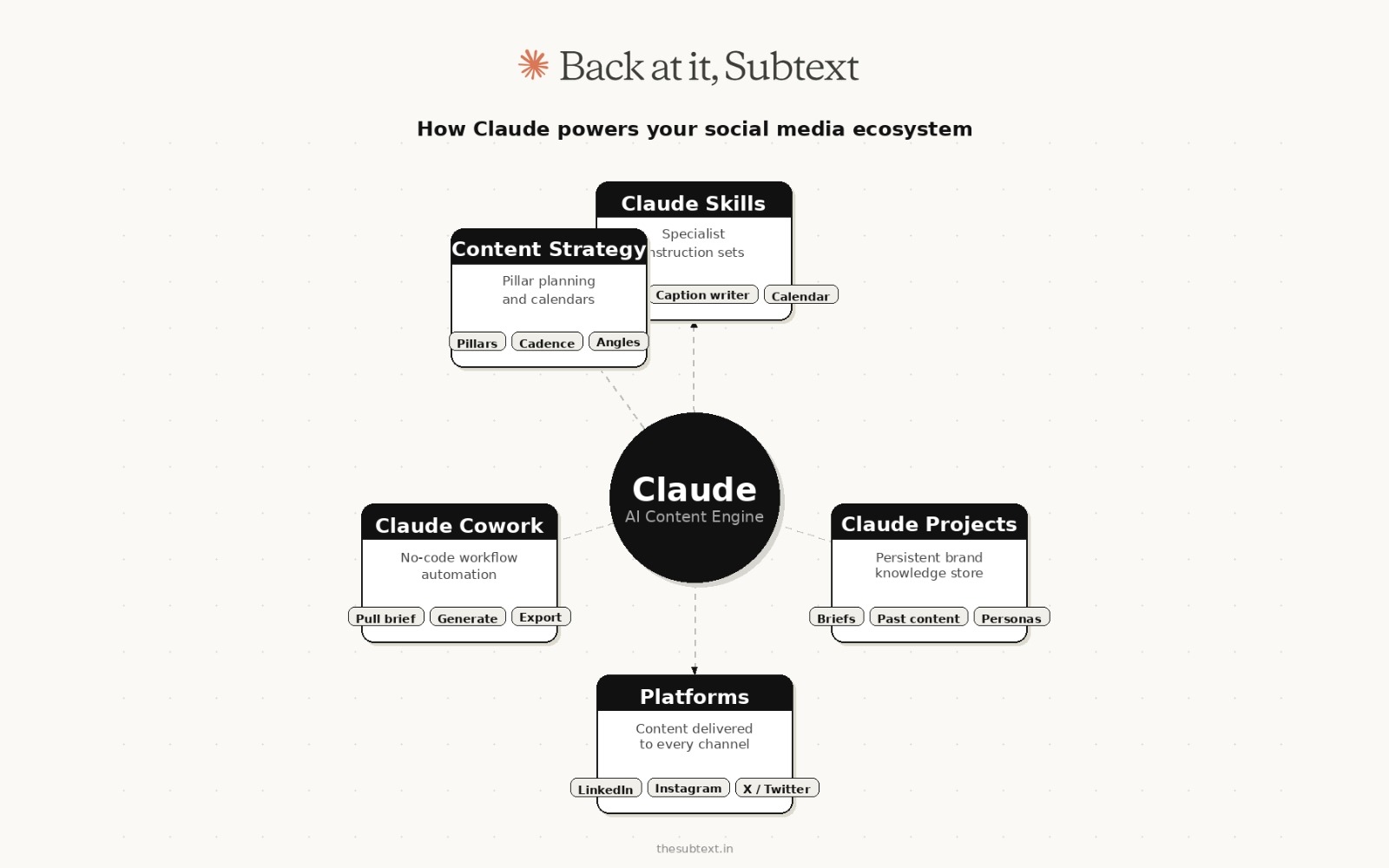
Claude Skills are what make that second version possible. A Skill is basically a pre-built instruction set that loads before your conversation starts. So instead of explaining your tone, your format preferences and your platform rules every single time, you explain them once, package them into a Skill and Claude just knows. From that point on it writes LinkedIn differently to Instagram, applies your hashtag logic without being asked and produces output that is actually close to ready rather than a starting point you have to drag across the finish line.
That is what separates Claude from every other option when it comes to the best social media content creation tools right now. Not the model itself. The infrastructure you build around it.
What follows covers all of it. What Claude Skills are, how to add them, how to build your own, the best ones worth using for social media content strategy, how to plan your social media posts at scale and an honest breakdown of where ChatGPT and Perplexity actually do things better. Because knowing which tool to reach for is half the job.
What Claude Skills Are and Why They Change Everything
Claude Skills are pre-built instruction sets that load into Claude before your conversation starts. Think of them as specialist overlays. You are still talking to Claude, but instead of a generalist, you are now talking to a version of Claude that has already been briefed with deep expertise in a specific domain.
When you activate a skill like a social media content planner, Claude does not just know that social media exists. It knows the format differences between LinkedIn and X. It knows caption length conventions, CTA placement, hook structures, hashtag logic and the difference between content that performs on feeds versus content that performs in search. All of that context is loaded before you type a single word.
This is where Claude Skills pull ahead of standard prompting. A good skill removes the need to re-explain your use case every session. It also produces more consistent output because the instruction baseline is fixed.
The difference in output quality between Claude with no skill versus Claude with a well-built social media skill is significant. We are talking about jumping from serviceable to actually good without changing the effort on your end.
Skills vs Projects vs Custom Instructions: Which One Does What
These three features sound similar and a lot of people use them interchangeably. They are not the same thing and understanding the difference changes how you set up your social media workflow entirely.
A Project is a persistent workspace. You upload documents once (brand guidelines, past content, audience personas, a brief) and every conversation inside that Project has access to all of it automatically. Projects are knowledge containers. They hold the context you want Claude to always have for a specific client or content series. The limit is 200K tokens of stored material and the content loads every time you open a chat inside that Project.
A Skill is a portable procedure. It does not store knowledge, it stores behavior. A social media Skill teaches Claude how to write captions in your format, how to structure a calendar, how to apply your hashtag logic. Skills activate automatically anywhere in Claude when the task matches, including inside Projects, in regular chats and in Claude Code. They do not sit in your context window constantly. Claude only loads the full Skill content when it detects a relevant task, which keeps responses fast even when you have multiple Skills configured.
Custom Instructions are always-on preferences that apply globally. Things like “always use British spelling” or “never use exclamation points” live here. They load in every conversation regardless of what you are doing.
For social media work specifically, the setup that works best is: a Project per client or content series containing their brand documents and past content, a Skill for each content type you produce repeatedly (captions, calendars, strategy outlines), and Custom Instructions for your non-negotiable formatting preferences. All three work together. A Skill can activate inside a Project, picking up the knowledge stored there and applying the procedure on top of it.
Projects provide static background knowledge that loads when you start chats within them. Skills provide specialized procedures that activate dynamically when needed and work everywhere across Claude. That is the distinction worth holding onto.
How to Add Skills to Claude
The process is simpler than most people expect.
Claude.ai on desktop or mobile:
- Open a new conversation
- Look for the Skills section in the left sidebar or settings panel
- Browse available skills or search by category
- Click to activate a skill before starting your conversation
- The skill loads automatically and stays active for that session
Via Claude Cowork:
Claude Cowork is Anthropic’s desktop tool built for non-developers who want to run file and task workflows. Inside Cowork you can build multi-step automation sequences that each use different skills at different stages. So your workflow might ingest a brief using one skill, generate a social media strategy outline using another and export formatted captions using a third. No code. Just configured steps.
For anyone doing volume content work, Cowork is where the time savings get serious.
Building custom skills:
If you are a developer or technically comfortable, you can write your own skills using Claude’s system prompt structure. A skill is essentially a well-engineered system prompt that defines a persona, a task scope, output format preferences and behavioral constraints. Anthropic’s documentation covers the format. The short version: write exactly what you want Claude to be, what you want it to do and how you want it to respond. Test it against your real use cases and iterate.
Building a Social Media Skill from Scratch (No Coding Required)
A Claude Skill is a folder containing a single file called SKILL.md. That file has two parts: a YAML block at the top that handles the metadata, and plain English instructions below it that tell Claude exactly what to do.
Here is what a basic social media caption Skill looks like:
—
name: social-caption-writer
description: Write platform-optimized social media captions for LinkedIn, Instagram and X. Use when asked to write captions, posts or social copy.
—
When writing social media captions:
- Ask for the platform, topic and any key message if not provided
- LinkedIn: 150-250 words, professional but conversational, strong opening line, end with a question or clear CTA, no more than 3 hashtags
- Instagram: 80-150 words, warmer tone, line breaks after every 2 sentences, 5-8 relevant hashtags at the end
- X: Under 280 characters for the main post, punchy opener, no hashtags unless specifically requested
- Always write 2 variations so the user can choose
Voice: Direct. No filler phrases. No “excited to share” or “I’m thrilled to announce.” Get to the point in line one.
—
The body of the file defines how Claude should perform the skill. Include an overview of what it achieves, the inputs it expects, the execution steps and optionally examples showing input-output pairs.
The description field is the most critical part. Claude uses the description to decide which Skill to load. If you have 10 different Skills set up, Claude scans through their descriptions and picks the one that fits your request. Write the description in the same language you would naturally use when asking for that task.
Once the file is ready:
- Create a folder and place SKILL.md inside it
- Zip the folder
- Go to Settings in Claude.ai then Capabilities then Skills
- Upload the zip file
- The Skill is now active across all your conversations
Skills work across Claude.ai, Claude Code, and the API with no changes needed between environments. Build it once and it works everywhere.
One shortcut worth knowing: Claude has a built-in Skill Creator. Enable it under Example Skills in the Skills settings, then start a conversation and ask Claude to help you build a skill. It will ask you three questions (what the skill does, when it should trigger, what the output looks like) and generate a ready-to-upload zip file for you.
How to Find the Best Skills for Your Use Case
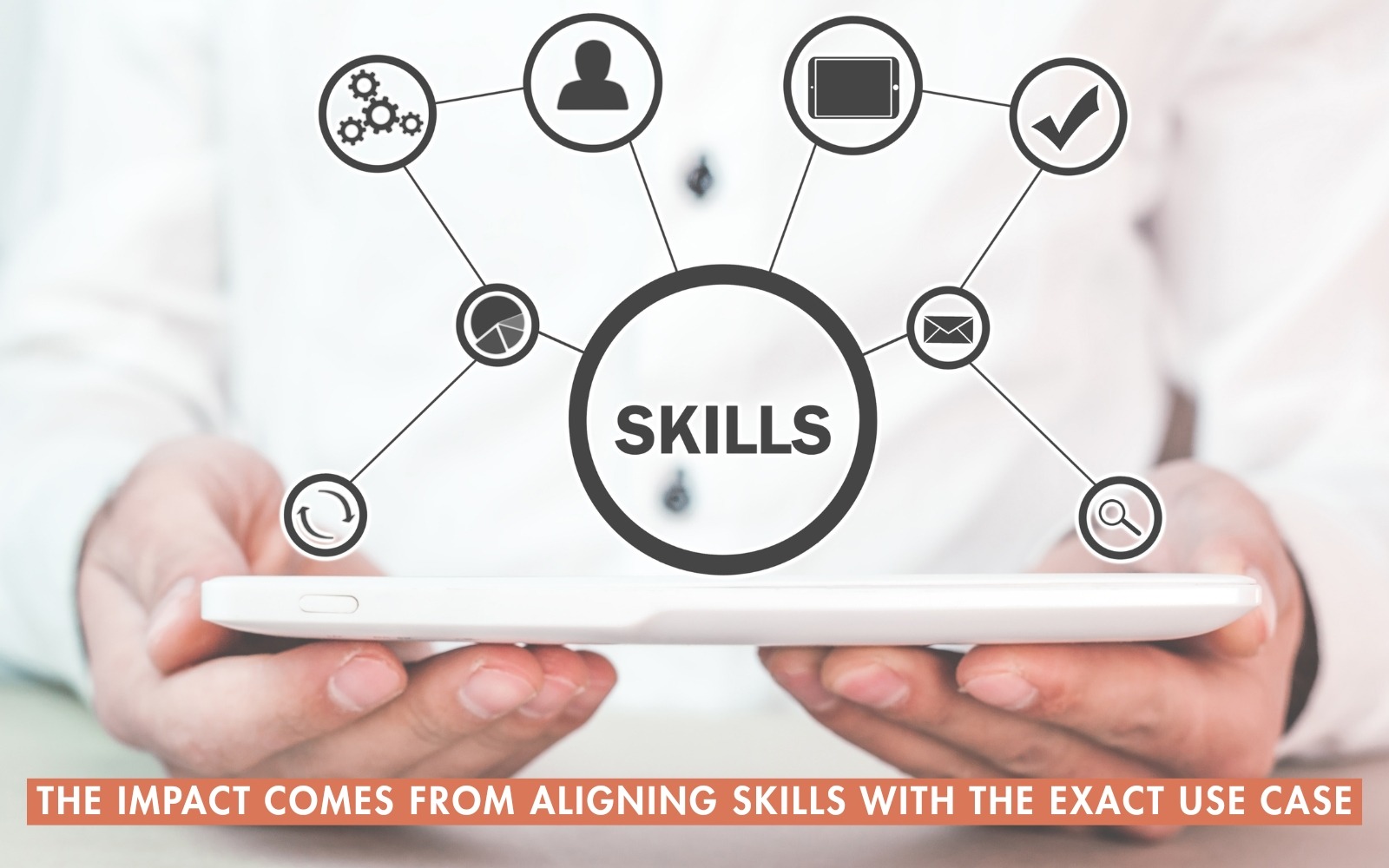
The skill directory is growing fast and quality varies. Here is how to filter efficiently.
Search by output, not by name. Instead of searching “social media” browse for what you want Claude to produce. “Caption writer” “content calendar” “hashtag strategy” and “post scheduler” will surface more relevant options than broad category terms.
Read the skill description carefully. Good skills describe their output format explicitly. If the description is vague, the skill probably is too.
Test on a real task immediately. The fastest way to evaluate a skill is to paste in an actual brief from your work, not a generic test prompt. Skills that look great on demo prompts sometimes fall apart on nuanced real-world context.
Check if the skill handles your platform mix. Some skills are built for LinkedIn specifically. Others try to cover all platforms and end up mediocre at each. If 80% of your work lives on one platform, find a skill built for that platform.
Ask Claude to recommend a skill. This sounds circular, but it works. Open a blank conversation with no skill active and ask: “I need to plan social media content for a B2B SaaS brand. What skill or prompt setup would serve me best?” Claude will often surface skill names or describe the configuration that fits your use case.
The Best Claude Skills for Social Media (What We Have Actually Used)
These are skills worth loading based on real use in content workflows, not feature lists.
Social Media Strategy Outline Skill
This one does the thinking work. Feed it your brand, your audience, your goals and your platforms. It returns a structured social media strategy outline broken into pillars, content types, posting cadences and key messages. The output is good enough to hand to a client or a team. It is not a template dump. It adapts to what you give it.
Caption Writing Skill
Optimised for platform-specific voice. When you specify LinkedIn, you get the right level of professional tone without the stuffiness. When you specify Instagram, it adjusts register, length and emoji use automatically. The hooks it generates are better than most of what you would write under deadline pressure.
Content Calendar Skill
Generates a full month of content ideas organized by date, platform and content type. Works best when you give it your content pillars in advance. The ideas it produces are not generic. It will pull in seasonal relevance, trending formats and topical angles based on whatever context you provide.
Hashtag and SEO Skill
Breaks down hashtag strategy by reach tier (broad, mid and niche) for each platform. Also identifies the keyword angle for any post so it performs in search as well as feeds. This is the skill that takes a post from visible to discoverable.
Brand Voice Skill
You feed it three to five examples of content that sounds like you. It learns the voice and applies it consistently across everything it writes afterward in that session. For agencies managing multiple client voices, this skill saves enormous amounts of editing time.
Social Media Content Strategy Plan Skill
A longer output skill that produces a full content strategy document rather than individual posts. It includes audience segmentation, platform selection rationale, content mix recommendations and social media strategy best practices adapted to your specific context. The output format is clean enough to use as a deliverable directly.

Content Repurposing: Where Claude for Social Media Saves the Most Time
The single highest-leverage thing Claude does for social media creators is not writing captions from scratch. It is turning one piece of content into five platform-ready pieces without losing the original voice.
The workflow is simple. You record a podcast episode, publish a long LinkedIn post, write a newsletter or shoot a YouTube video. Instead of manually summarizing it for each platform, you paste the transcript or content into Claude with the right Skill active and get back a full repurposing package.
A complete repurposing output from a well-configured Claude Skill looks like this:
Input: A 2,000-word newsletter on founder mistakes in their first year
Output:
- LinkedIn post (200 words, narrative hook, personal angle)
- 3 X posts pulling the sharpest individual insights
- Instagram caption with carousel concept outlined
- A short-form video script (60 seconds) hitting the core idea
- 5 hashtag sets by platform
All of that from one input. The time it replaces is real: manual platform adaptation for a single piece of content typically takes 45-90 minutes. With Claude and the right repurposing Skill loaded, it takes under five minutes including review.
The key to making this work well is specificity in your Skill or prompt. Tell Claude exactly what each platform version needs. LinkedIn posts that get engagement tend to be 150-300 words, lead with a strong hook, use generous line breaks, and end with a question or call to action. X needs a completely different approach. Instagram needs a different register again. A well-built repurposing Skill encodes all of those differences so you never have to explain them again.
For video content specifically, there is a Claude Code Skill worth knowing about called Content-to-Social. It automates repurposing long-form content into social media assets by analyzing a newsletter or article to extract core insights, data points and transformation stories, then adapting them into platform-specific formats like Twitter threads, LinkedIn story-posts and Instagram carousel concepts. It goes further than simple reformatting. It thinks about which angle from the source material will land on each platform.
For teams running any volume of content at all, this repurposing workflow is where Claude pays for itself fastest.
Setting Up Claude Projects for Ongoing Social Media Work
If you are managing social media for more than one brand, or doing any kind of recurring content work, Claude Projects is what separates a one-off session from an actual system.
A Project is a persistent workspace. You upload your documents once and every conversation inside that Project has access to all of them without you pasting anything in. For social media specifically, one well-configured Project per brand eliminates the “cold start” problem entirely.
What to upload into a social media Project:
- Brand voice document (tone, words to use, words to avoid)
- Audience persona document (who they are, what they care about, what they respond to)
- 10-15 examples of past posts that performed well
- Platform guidelines (character limits, format preferences per platform)
- Content pillars document
- Any recurring content series briefs
Teams report 40% faster content creation when using Projects versus standard chat. The reason is simple: you skip the 5-10 minutes of re-briefing Claude at the start of every session. Open the Project, start writing.
The combination that works for high-output social media teams is Projects plus Skills. The Project holds the brand knowledge. The Skill holds the procedure. When you open a session inside a brand Project and ask for a LinkedIn caption, Claude pulls the brand knowledge from the Project and applies the caption-writing procedure from the Skill simultaneously. Use a Project to keep everything related to a subject in one place and use a Skill to make sure Claude always knows how you want things done. Syr
One practical tip: upload your best-performing posts to the Project and tell Claude why they worked. “This post got 3x our usual engagement because the opening line led with a counterintuitive claim.” That kind of annotated example library trains Claude to replicate the patterns that actually work for your specific audience, not just generic best practices.
Claude for Social Media: Where It Actually Outperforms Every Other Tool
Claude context window is not a technical detail. It is the reason Claude handles complex social media work better than anything else available.
When you are building out a social media content strategy plan, you often need to hold a lot of information simultaneously. The brand brief. The competitor landscape. The audience personas. The content pillars. Six months of past content. Platform-specific constraints. Most AI tools choke on this volume and start losing context halfway through. Claude holds all of it and reasons across the full picture.
This is also why Claude is better for long-form planning. If you want to plan your social media posts for a full quarter, including copy variations, visual direction notes and scheduling logic, Claude can take a single thorough brief and produce the whole plan without losing the thread. That is precisely why we encourage using Claude and any such AI tools for social media marketing.
The other place Claude wins is instruction-following precision. When you need it to write in a specific format, use specific words, avoid specific phrases or match a specific brand voice, Claude is more reliable than any other model at actually doing what you asked. It does not drift. It does not add things you did not ask for. It executes.
For anyone serious about building a social media strategy outline and actually using it as a working document rather than inspiration, Claude is the right tool.
What to Use ChatGPT For
ChatGPT is good at brainstorming. It is enthusiastic and fast and generates a high volume of ideas in a short time. That energy is useful when you are stuck or exploring unfamiliar territory.
Use ChatGPT for:
Idea generation at speed. When you need 50 content ideas and want to filter down to 5, ChatGPT’s volume works in your favor. It does not overthink. It generates.
Code with Operator access. GPT-4o with code interpreter is still the fastest path for quick data analysis, spreadsheet automation and simple scripts when you have a non-technical audience in mind.
DALL-E image generation. The native image generation inside ChatGPT is genuinely useful for social graphics, moodboards and concept visuals when you need something fast and good enough.
Broad creative exploration. Fiction, worldbuilding, creative writing prompts and lateral thinking exercises. ChatGPT has a creative looseness that works well when you want unexpected directions.
Plugin and GPT store integrations. If you need a specific third-party workflow, ChatGPT’s plugin ecosystem is larger and more mature than Claude’s current Skills library.
Where ChatGPT tends to fall short: consistency, instruction precision and handling large complex documents. It also has a tendency to add unsolicited commentary and qualifications that you then have to edit out.
What to Use Perplexity For
Perplexity is a research tool first. The social media application is fairly specific but genuinely valuable.
Use Perplexity for:
Trend research with sources. When you need to know what is actually trending in a niche right now, Perplexity pulls live web data and cites its sources. This is much more trustworthy than asking any LLM from training data.
Competitive content research. Search a competitor or topic and Perplexity surfaces real-time content performance signals, recent coverage and angle ideas based on what is actually getting traction.
Fact-checking before publishing. Any statistic or claim you plan to use in social content should go through Perplexity for a quick verification check. It will tell you where the number comes from or flag if it cannot find a credible source.
Topic deep dives before writing. Spend ten minutes in Perplexity on a topic before writing. You will walk out with actual data points, recent developments and angles you would not have found by prompting a closed-model LLM.
Building source libraries for authority content. If you produce LinkedIn content or long-form posts that cite research, Perplexity is faster than Google for assembling a source list.
Where Perplexity is not the right choice: writing, content creation, strategy planning and anything that needs a consistent voice or structured output. It is a research tool that happens to synthesize well. It is not a content creation engine.
The Three-Tool Stack That Actually Works
Once you understand what each tool is good at, the workflow becomes clear.
Start with Perplexity to research the topic, validate angles and pull real data. Move into Claude with the right skill loaded to build the content strategy, write the copy and refine the voice. Use ChatGPT when you need raw idea volume or image generation for the visual layer.
This is not about loyalty to one tool. It is about using each one where it is actually strong.
The mistake most creators make is trying to do everything in one tool. The ones producing the best content use all three with intention.
Using Claude Cowork for Social Media Workflows at Scale
Claude Cowork is worth a dedicated section because most people do not know it exists or do not understand what it actually does.
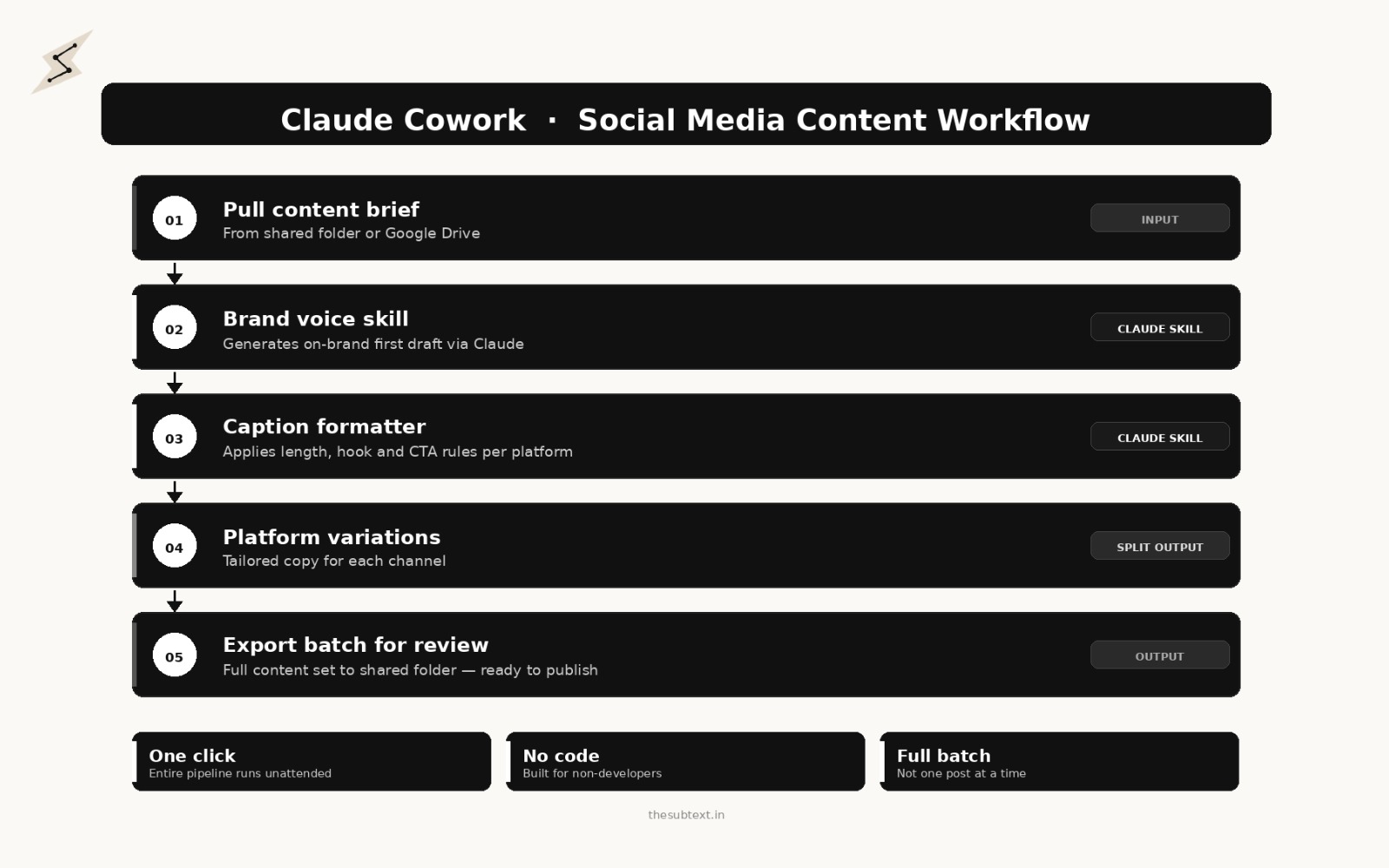
Cowork is a desktop application built for non-developers. It lets you build multi-step automation workflows using Claude without writing any code. For social media teams, the use cases are substantial.
A typical Cowork workflow for a social media team might look like this: pull a content brief from a shared folder, run it through a brand voice skill to generate a first draft, pass the output through a caption formatter, generate platform variations for LinkedIn and Instagram and X, then export the whole batch to a shared folder for review. All of that runs as a single configured workflow. You press run and come back to a full content batch.
This is what best social media content creation tools should do. Not just help you write one caption at a time. Actually reduce the repetitive work at every stage of a content production process.
Cowork is in beta but it is already functional for the kind of volume workflows that would otherwise require dedicated prompt engineers or expensive third-party automation stacks.
Most Agencies Are Still Prompting Like It’s 2023. We’re Not.
There is a real divide opening up in marketing right now. On one side you have agencies still copy-pasting into ChatGPT, manually reformatting for each platform and calling it an AI strategy. On the other side you have a small number of teams who have actually rebuilt how they work around tools like Claude, and the output gap between the two is getting harder to ignore.
Subtext sits firmly in the second camp. We are a full-service digital marketing agency and we have spent the last two years doing the thing most agencies talk about but very few actually do: rebuilding every content workflow around AI so the output is faster, more consistent and genuinely better than what a traditional production process delivers.
That means when you work with us you are not getting a team that occasionally uses AI to speed things up. You are getting a team where Claude Skills, Claude Projects and structured content systems are the foundation of how every deliverable gets made, not a finishing trick applied at the end.
What that looks like in practice:
We handle social media content creation across every platform, built on AI-powered content strategy that starts with your actual brand voice rather than a generic brief. Every content series we produce has a Skills-backed workflow behind it so the tone, format and platform logic stays consistent whether we are writing your tenth LinkedIn post or your hundredth Instagram caption.
For brands that want the strategy layer first, we build social media content strategy plans that are designed to be executed by AI systems, not just read and filed. That means content pillars, platform-specific angle maps and a production architecture your team can actually run.
For marketing managers and founders who want to bring this capability in-house, we run consulting and training engagements where we build out your Claude Projects, configure your Skills library and hand your team a system they understand and can operate without us. The goal is not dependency. It is capability transfer.
And for brands that want the whole thing handled, SEO, paid, email, social, content production and distribution, we do that too. The difference is that our full-service work is built on infrastructure that scales without the headcount a traditional agency model requires.
The honest pitch is this: AI is not the future of content marketing. It is the present. Brands and agencies that are still treating it as a productivity add-on are going to spend the next two years catching up to teams that treated it as a structural rebuild from the start.
If you want to be in the second group, Subtext is where that work starts.
Social Media Strategy Best Practices When Using Claude
A few things that make a real difference in output quality when using Claude for social media work.
Front-load your context. The more Claude knows at the start, the better every output is. Do not trickle information across multiple prompts. Give it everything upfront: your brand, your audience, your voice, your goals and your constraints.
Give it examples of content you love. Abstract instructions like “write in a conversational tone” produce mediocre results. Three examples of posts that match your voice produce accurate results.
Be specific about what you do not want. Claude follows negative instructions well. Tell it to avoid passive voice, skip exclamation points, not use certain phrases. It will actually comply.
Treat the first output as a draft. The first version Claude produces is rarely the final version. It is a very good starting point. Iterate with specific feedback rather than re-running from scratch.
Save your best system prompts. When you find a prompt configuration that produces exactly the right output, save it. That is your template for the next time you need the same type of content.
The Mistakes That Make Claude Output Generic (And How to Avoid Them)
Most people who feel like Claude is not good at social media are making one of these errors.
Zero-shot prompting for every session. Typing “write me a LinkedIn post about leadership” with no context produces the same output 10 million other users are getting. Claude has no idea who your audience is, what your voice sounds like or what angle you want. The solution is either a well-configured Skill or a Project with your brand context loaded. Generic input produces generic output every time.
Accepting the first draft. Claude’s first output is a strong draft, not a finished post. The people getting the best social content from Claude treat it as a 70% solution and spend 2 minutes refining the voice, sharpening the hook and adding a specific detail or opinion that only they could add. Ask Claude for 2-3 variations of each post rather than accepting the first draft. Variation is especially important for high-engagement formats like LinkedIn stories or X threads, where the opening hook is everything.
Building one massive Skill that does everything. A “social media Skill” that handles captions, calendars, hashtag research and strategy planning will trigger inconsistently and produce mediocre output across all of them. Build separate focused Skills: one for captions, one for calendars, one for strategy documents. Claude out of the box doesn’t know what works for your audience. The quality of future output improves dramatically when you share what has actually worked.
Not giving Claude examples of what worked. Telling Claude “write in a warm conversational tone” is far less effective than pasting three posts that got strong engagement and saying “match this voice.” Examples beat adjectives every time.
Using it to replace human judgment entirely. Claude can handle the social media content strategy plan and first drafts at scale. It cannot replicate a genuine opinion formed from lived experience, a real reaction to something that happened today or the specific detail that makes a post feel personal. The accounts producing the best content use Claude for the production layer and keep the human layer for the stuff only they can say.
Frequently Asked Questions
Is Claude good for social media content creation?
Claude is the strongest AI for social media content work that requires consistent voice, long briefs and structured output. Its ability to hold large amounts of brand context without losing coherence makes it better than ChatGPT for anything beyond one-off posts. With Claude Skills configured for your specific use cases, the quality gap between Claude and other tools is substantial.
What are Claude Skills?
Claude Skills are instruction packages stored in a SKILL.md file that teach Claude a specific workflow or behavior. A Skill activates automatically when Claude detects a relevant task. For social media, you can build Skills for caption writing, content calendars, hashtag strategy, brand voice application and content repurposing. Skills work across Claude.ai, Claude Code and the API with no modification required.
How is Claude different from ChatGPT for social media?
Claude follows complex instructions more precisely, holds larger amounts of context without losing coherence and produces more consistent output across a long session. ChatGPT has advantages in idea volume and image generation. For systematic social media production work, Claude outperforms. For rapid brainstorming and visual content, ChatGPT is the better choice.
Do Claude Skills work on the free plan?
Skills are available for users on free, Pro, Max, Team and Enterprise plans. The feature requires code execution to be enabled. Claude
What is Claude Cowork?
Claude Cowork is a desktop application from Anthropic built for non-developers. It lets you build multi-step automated workflows using Claude without writing code. For social media teams, it is the tool that turns Claude from a writing assistant into a production system capable of running content batch workflows automatically.
Can I use Claude Skills inside Claude Projects?
Yes. Skills and Projects work together. A Project stores your brand knowledge and context. A Skill stores your content production procedures. When you run a session inside a Project with a Skill active, Claude applies both simultaneously, using the brand context from the Project and the procedure from the Skill.
The Part Nobody Talks About After “Just Use AI”
The gap between creators who use Claude as a basic text generator and creators who use it with the right skills, the right context and the right workflow is significant. Both groups are technically using the same tool. The outputs look nothing alike.
Claude skills close a lot of that gap automatically. The right skill means you spend less time prompting and more time refining. Combined with Claude Cowork for workflow automation and a tool like Subtext for performance intelligence, you end up with a content operation that would have required a team of three to run manually two years ago.
The AI tools are all improving fast. But the leverage point right now is not which model is marginally better at a task. It is whether you know how to configure the tool you are using so it stops working against you and starts working consistently.
Claude for social media, with skills loaded and context provided, is that configured version. Start there.
And if you want someone to build that configuration for you, that is exactly what we do at Subtext. Our AI automation service handles the setup work most teams never get around to: Skills built for your brand, Projects loaded with your content, workflows that run without hand-holding. Our marketing consultancy takes it further, sitting alongside your team to build a content operation that actually scales rather than one that just looks like it does on paper. The difference between knowing the tools exist and having them working for your specific business is where most brands get stuck. That gap is our job.